Sell
Follow-up reminders: no follow-up forgotten
Most deals are lost in the gap between the first call and the second. Gandiv attaches a date to every lead and pushes reminders until the task is done.
4 types
call, visit, WhatsApp, task
Push + WhatsApp
reminder channels
Escalation
to manager when overdue
Reminder types
Call, visit, message or custom task
Set the next step as a call back, site visit, WhatsApp message or any task you define, with a date, time and note. The type shows on the agent's day view so they know what to prepare before the moment arrives.
- Call, visit, message, task
- Date, time and note
- Repeat schedules
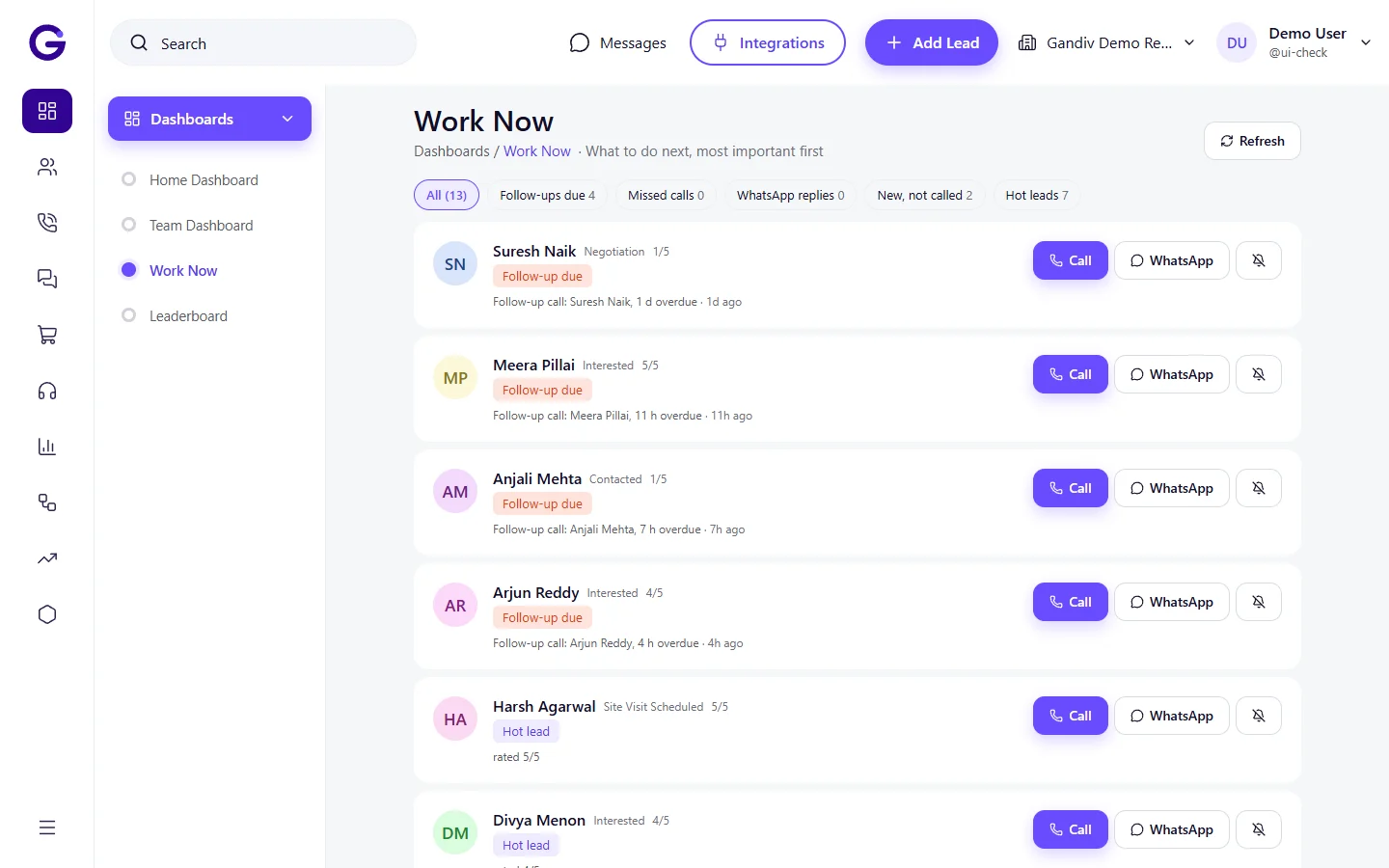
Today view
A clear list for the day
Agents open one screen showing today's follow-ups, overdue ones and upcoming tasks, sorted by time. They tap to call, chat or reschedule, so the first hour of the day starts with action instead of searching.
- Today, overdue, upcoming
- One-tap call or chat
- Snooze and reschedule
Today view
- Today, overdue, upcoming
- One-tap call or chat
- Snooze and reschedule
Push + WhatsApp
Alerts where agents already look
Reminders reach agents as app push notifications and, if enabled, as a WhatsApp message to the agent's own number. Pick how many minutes before, and add a second nudge if the task is still untouched.
- Mobile push alerts
- Agent WhatsApp reminders
- Lead-time and repeat nudges
Push + WhatsApp
- Mobile push alerts
- Agent WhatsApp reminders
- Lead-time and repeat nudges
Overdue digest
A morning list of what slipped
Each agent and manager receives a daily digest of overdue follow-ups with lead names and ages. The list is short and specific, which makes it far easier to act on than a general chase from a manager.
- Daily digest by email or app
- Sorted by age and value
- Manager sees the team's list
Overdue digest
- Daily digest by email or app
- Sorted by age and value
- Manager sees the team's list
Escalation
Move stuck tasks up the chain
If a follow-up stays overdue past your limit, Gandiv alerts the team lead and can reassign the lead. High-value leads can have tighter limits, so the important ones never sit quietly for days.
- Escalate after set hours
- Stricter rules for hot leads
- Optional auto-reassign
Escalation
- Escalate after set hours
- Stricter rules for hot leads
- Optional auto-reassign
Customer reminders
Remind the customer too
Send a WhatsApp or SMS reminder for site visits, demos and appointments before they happen, with a reschedule link. Fewer no-shows means your team's time goes to people who actually turn up.
- Pre-visit reminder messages
- Reschedule request link
- Templates per stage
Customer reminders
- Pre-visit reminder messages
- Reschedule request link
- Templates per stage
How it works
- 1
Set the next step
After every call, pick the follow-up type and date on the lead.
- 2
Get nudged
Receive push and WhatsApp alerts at the time you chose.
- 3
Done or escalated
Mark it complete, or an overdue task is escalated to your manager.
Works with
Used in these industries
Frequently asked questions
Can reminders sync to Google Calendar?
Yes. Follow-ups and site visits can appear in a connected Google Calendar so agents see them beside other commitments.
Are WhatsApp reminders sent from my number?
Agent reminders go through the WhatsApp channel you have connected. Using the Business API is the compliant route for automated messages.
Can I force agents to set a next follow-up?
Yes. You can require a next step on chosen dispositions, so a call cannot be closed out without a date.
What counts as overdue?
A follow-up past its time and not marked complete. You set the grace period used for digests and escalation.
Can a manager see all agents' reminders?
Yes, based on role. Managers see their team's tasks and can reassign them.
See Gandiv on your own leads
Start free, or book a short demo and we will set it up with your pipeline.