Sell
Quote to invoice without leaving the CRM
Build GST-ready quotations from your product catalogue, send them as a PDF on WhatsApp, get them accepted and convert to an invoice in one click.
GST ready
CGST, SGST or IGST chosen by place of supply
Versioned quotes
v1, v2, v3 kept so you can show what changed
PDF and e-sign
Branded PDF with click-to-accept or e-sign
Catalogue
Products and prices in one place
Keep your products and services with HSN or SAC code, unit, price, GST rate and discount rules. Price lists for different customer groups are supported. Agents pick from the list instead of typing amounts, so the same item never carries two prices.
- HSN or SAC per item
- GST rate per item
- Price lists by customer group
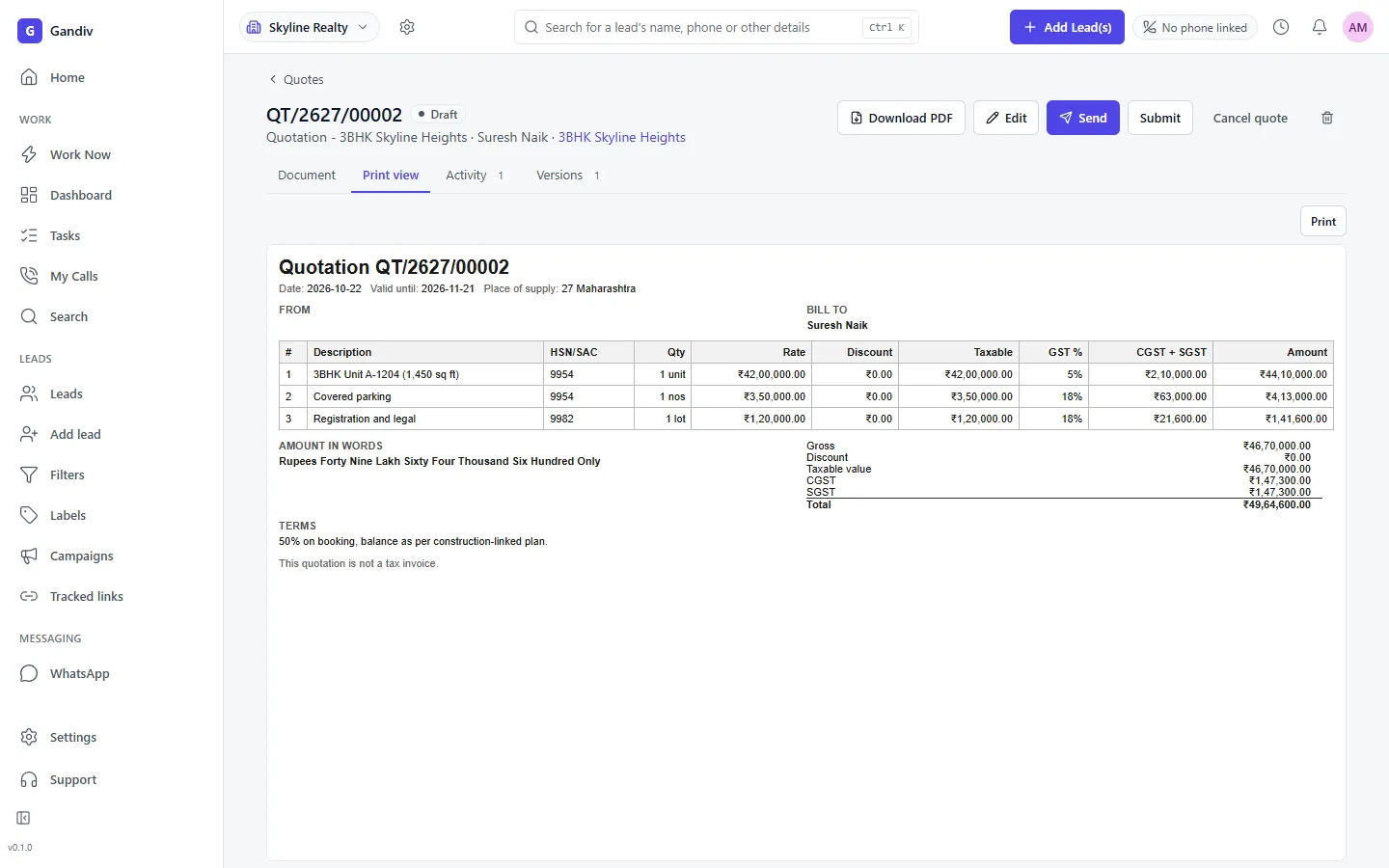
Templates
A quote that looks like your company
Choose a template with your logo, terms, bank details and validity date. Add line items, line-level or overall discounts and notes. The PDF prints the rupee symbol correctly, and a quote can be built from a lead in under a minute.
- Your logo and terms
- Line and overall discount
- Validity date
Templates
- Your logo and terms
- Line and overall discount
- Validity date
GST fields
Tax worked out for the right state
Enter the customer's GSTIN and place of supply; Gandiv applies CGST and SGST for the same state and IGST for another, and shows the tax split on the document. Slabs follow the current GST rates, including exempt and nil-rated items.
- CGST, SGST or IGST
- GSTIN on document
- Exempt and nil items
GST fields
- CGST, SGST or IGST
- GSTIN on document
- Exempt and nil items
Send and accept
Share on WhatsApp, get a yes
Send the PDF or a view link on WhatsApp or email. The customer can accept, ask for changes or sign electronically through a supported provider. Every view and acceptance is recorded on the lead timeline, so follow-up calls happen at the right moment.
- View tracking
- Click-to-accept
- E-sign via provider
Send and accept
- View tracking
- Click-to-accept
- E-sign via provider
Versions
Negotiate without losing history
Each revision becomes a new version of the same quote, with the earlier ones kept. Managers can approve discounts above a limit before a quote is sent. You always know what price was offered, by whom and when, even months later.
- All versions kept
- Discount approval limit
- Who offered what
Versions
- All versions kept
- Discount approval limit
- Who offered what
Invoice
Accepted quote becomes an invoice
Convert an accepted quote into a tax invoice with the next number in your series, then attach payment links or an instalment plan. Totals flow to reports, and the invoice can be exported for your accountant or accounting software.
- One-click convert
- Numbered series
- Export for accounting
Invoice
- One-click convert
- Numbered series
- Export for accounting
How it works
- 1
Add your catalogue
Import or enter products with HSN or SAC code, price and GST rate.
- 2
Build the quote
Open a lead, add items and discount, and review the PDF preview.
- 3
Send and convert
Share on WhatsApp, track acceptance and convert to an invoice with a payment link.
Frequently asked questions
Is the quotation GST-compliant?
It shows GSTIN, HSN or SAC, tax split by place of supply and your numbering. Whether a document meets your obligations should be confirmed with your accountant.
Does it generate e-invoices with IRN?
Gandiv creates invoices for your sales workflow. IRN and e-way bill filing are not part of this feature; export to your accounting software for statutory filing.
Can the customer sign the quote?
Yes. The customer can accept online, and e-signature is available through a supported provider where you have an account with them.
Can I change the PDF design?
You can choose and edit templates with your logo, terms and bank details. Custom layouts beyond that can be requested.
Can discounts need approval?
Yes. Set a discount limit per role, and quotes above it are held for a manager's approval before they can be sent.
See Gandiv on your own leads
Start free, or book a short demo and we will set it up with your pipeline.